Want to download Roblox on your phone, computer, or console?
See everything you need to know before installing it.
With more than 380 million monthly active users since last year, Roblox has become a global phenomenon, offering a universe of creativity and fun.
It’s more than just a game; it’s a platform where millions of unique experiences are waiting for you to discover.
Advertisement
What can you do inside Roblox?
Before we go over the download steps, let’s talk about what makes Roblox so special.
It’s not just a single game, but rather a huge collection of worlds and games created by a global community of developers.
Variety is what keeps players coming back, with standout games like “grow a garden” attracting millions of simultaneous users. Here are just a few types of games you can explore:
Role-playing games (RPGs): Live out fantasies in magical worlds, adopt virtual pets, or work in a virtual city.
Action and Adventure: Overcome challenging obstacle courses (known as “obbies”), solve mysteries, or survive thrilling scenarios.
Simulators: Try out different jobs and lifestyles, from managing a restaurant to becoming a professional athlete.
Strategy and Tycoon: Build giant empires, run businesses, and watch your creations grow.
Social hangouts: Join virtual spaces to chat with friends, customize your avatar, and take part in virtual events.
Official Roblox download methods for different devices
One of the best things about Roblox is its incredible accessibility.
You can play seamlessly across multiple platforms., allowing you to switch between your phone and your laptop without losing progress.
Below, we’ll break down the process for each main type of device.
Advertisement
Android and iOS: How to download on smartphones
Since many players use mobile devices, it’s clear that playing anywhere is the most popular way to experience Roblox.
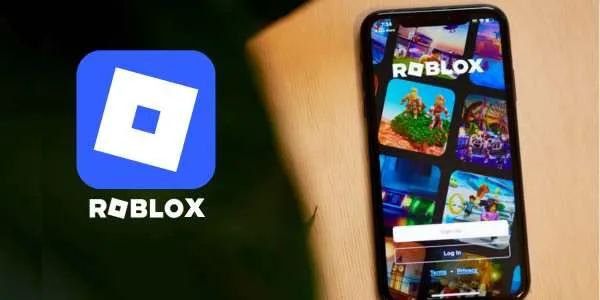
The process is incredibly simple and takes just a few minutes, whether you’re an Android or iPhone user.
Open your device’s app store: For Android, go to the “Google Play Store“ and for iOS, open the “Apple Store”.
Search for “Roblox”: In the search bar, type the app name and select the official result.
Tap “Install” or “Get”: Select one of the install buttons on your device to start the download.
Launch the app: After installation, find the Roblox icon on your home screen and tap it to open it.
With the app installed, you’re ready to create an account and start exploring millions of games in the palm of your hand.
Windows and Mac: How to download on computers
The download process is done through the official Roblox website, ensuring that you get the correct and most up-to-date version of the game client.
Go to the official Roblox website: Open your web browser and navigate to roblox. com.
Sign up or log in: First, you’ll need to create an account or log in to an existing one.
Select any game and click “Play”: Find a game that looks interesting and click the green “Play” button.
Download and run the installer: Select the “Download and install Roblox” button and, once it finishes, open it to start the installation.
Start playing: Now you can return to the website and select any play button to launch the game automatically in Roblox Player.
Now you’re ready for a high-performance gaming experience.
Xbox and PlayStation: How to download games on consoles
Playing on a big TV with a controller offers a uniquely comfortable and immersive way to explore your favorite games.
The download process is just as simple as it is on other devices.
Turn on your console and open the store: On Xbox, navigate to the “Microsoft Store”On PlayStation, open the “PlayStation Store”.
Search for “Roblox”: Use the search function to find the official Roblox app.
Select and download it: Choose the Roblox app in the search results and select “Get” or “Download”.
Launch the game: After the download is complete, you’ll be able to find Roblox in your game library and launch it.
After installing Roblox on your preferred device, the next universal step is to create an account to save your progress and customize your identity.
How to create your account and adjust your preferences
After your Roblox download is complete, you’ll need an account to get started.
Your account is your passport to the entire Roblox universe, allowing you to save your avatar’s appearance. Keep track of your friends and maintain your progress across different games.
The sign-up process is designed to be quick and easy.
Open the Roblox app and click “Sign Up”: You’ll be asked for your date of birth (this helps ensure age-appropriate settings).
Choose a unique username: This is the name other players will see, so be creative!
Create a secure password: Make sure it’s something you’ll remember, but difficult for others to guess.
Adjust your settings: After creating your account, you can click the gear icon to explore the settings, where you can adjust privacy options, notifications, and much more.
With your account ready, you’re officially a Robloxian!
Tips for new players to get the most out of the experience.
Joining a platform as large as Roblox can feel a little overwhelming at first, but a few simple tips can help you get comfortable quickly.
Focusing on exploration and customization is a great way to get started and will help you along the way.
Discover what you enjoy most. and leave your mark.
Explore the Discover page: Don’t limit yourself to only the most popular games; the Discover page is full of hidden gems and new experiences.
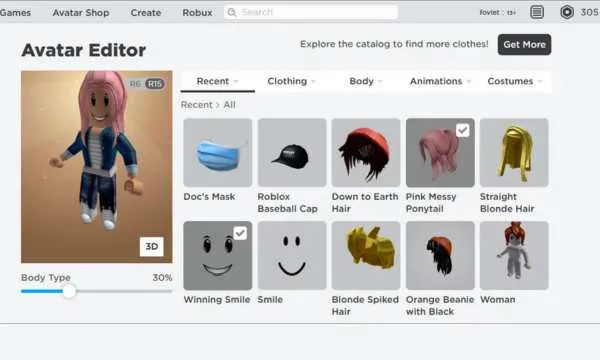
Customize your avatar: Your avatar is your digital identity! Spend some time in the Avatar Editor to create a look that’s uniquely yours.
Learn more about Robux: Robux is the in-game currency. While most games are free, Robux can be used to buy items and special abilities.
Connect with your friends: Use the search bar to find friends who also play Roblox and add them. Playing together makes the experience even better.
Stay safe: Pay attention to the platform’s safety rules and do not share personal information.
Now you’re fully equipped to handle the Roblox download on any device, create your account, and start exploring.
The platform offers a constantly evolving universe of games and social experiences, so there’s always something new to discover.
Whether on your phone, computer, or console, your next adventure is just a few clicks away.