Blood pressure is one of the most important health indicators and is of vital importance for cardiovascular health.
In recent times, technological advances have provided us with several digital tools to better control blood pressure with practicality and ease.
In this sense, we have the SmartBP app, a tool available for Android and iOS devices, which also offers compatibility with various blood pressure monitors.
Using SmartBP, it is possible to keep a more accurate and continuous record of measurements and then share the reports with whomever you want.
So that you can better control your blood pressure and leave pen and paper behind, I created a complete review with everything you need to know about this innovative tool.
Advertisement
Follow everything in today’s post! It is worth noting that, before using any kind of device or app, it is recommended to consult your doctor.
How to download the SmartBP app?
To download SmartBP to your phone, follow the steps below:
- Go to your phone’s app store (Google Play or App Store).
- Type “SmartBP” into the search bar and click the magnifying glass.
- As soon as the search result appears, click the app icon.
- Then tap the “Install” (Android) or “Get” (iOS) button.
- Wait a few seconds while the app is downloaded and installed on your device.
- Ready! SmartBP is now available on your phone.
Making your first access
After installing the app on your phone, open it for the first time. Initially, the platform provides some information about blood pressure and asks how this new tool can help control the condition.
A major advantage of SmartBP is that you do not need to create an account to use the app.
Next, the different Premium version plans appear, which offer extra features and are ad-free.
Advertisement
Even so, the free version may very well meet your needs if you do not want to purchase any of the plans.
Next, you will have access to the home screen, where you will find the available features and the main sections (located at the bottom of the screen): Home, Insights, History, Main, and More.
Recording your blood pressure readings
As you can see, SmartBP has a very friendly and intuitive interface, since on the home screen you can easily find everything you need to keep better control at a glance. It’s time to “retire” pen and paper.
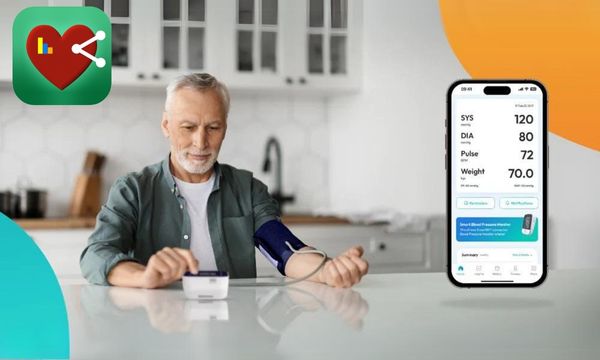
Now, to start recording your blood pressure readings, on the home screen you will find a table with the following fields to fill in: systolic pressure, diastolic pressure, pulse, and body weight.
To enter data, tap the first field and add the value for each one.
After entering all reading data, click “Done”. Next, a new screen will open where you can edit the date and time of the reading, as well as include details about the measurement location, tags, and notes. To finish, click “Save.”
Done! The procedure is really very simple and practical, which makes the tool easier to use even for those who are not very familiar with technology.
To add new readings, simply follow the same procedure mentioned above again.
Viewing charts and trends
Thanks to reading records, SmartBP allows access to charts, statistics, and analyses.
By enabling real-time monitoring, the tool provides immediate information about blood pressure fluctuations, increasing the user’s awareness of specific patterns and triggers.
Viewing charts and statistics over time makes it easier to identify correlations between blood pressure and habits such as diet, exercise, and sleep, allowing lifestyle adjustments to improve health.
Therefore, to view charts and trends, select the “Insights” section and choose what you want to view at the top of the screen.
In addition, you can also view the history of recorded readings by clicking on the “History” section.
Enabling reminders in SmartBP
If you have any difficulty remembering to measure your blood pressure, or even to take your daily medications, the app can become an excellent ally in your routine.
To set reminders, click on “Reminders,” located below the box where you record BP readings.
With this feature, you can enable reminders for: blood pressure measurement, medications, ECG, and report sharing.
You can also add a specific reminder that is not on the list by clicking “Add a reminder.”
If you want to set, for example, a reminder to measure your blood pressure, click on it.
Then enter a title of your choice, write a description, set the times, and even add an image.
After the procedure, click “Update”. Follow the same steps if you want to set other reminders.
Sharing reports
Using this innovative blood pressure monitoring tool, you can share all recorded readings with doctors, healthcare professionals, or family and friends.
This can be very helpful because, for example, your doctor can analyze your BP readings even remotely and make adjustments to your treatment, if necessary.
To share, click on the “History” section and select which reading you want to share, or simply click the box in the upper right corner of the screen to select all readings.
Then tap “Share,” choose the format (PDF or CSV), and select where you want to share the data, whether via WhatsApp, email, Bluetooth, among others.
After that, follow the instructions that appear on the screen.
You can also print to PDF and even share via SMS.
Connecting blood pressure monitors
To connect a BP monitor via Bluetooth, follow the steps below:
- Set up your blood pressure monitor: Install the batteries, connect the cuff, and follow the instructions provided to set up your blood pressure monitor.
- Connect Bluetooth: Turn on Bluetooth on your mobile device. In the SmartBP app, select “More,” then “BP Monitor,” enable the “Connect with Bluetooth” option, and authorize the connection.
- Confirm that SmartBP has read your BP monitor: Put on the cuff and take a measurement. The data will be transferred automatically to the SmartBP app, as long as the phone is close to the blood pressure monitor and the app is open.
Conclusion
The SmartBP app truly offers a convenient and effective solution for blood pressure control, allowing accurate and continuous recording of measurements.
By downloading the app, you will have access to intuitive features that simplify the management of your cardiovascular health.
Always remember to consult your doctor before using any app or device.
Now, follow the steps to download it, log in for the first time, record your readings, view charts, enable reminders, share reports, connect blood pressure monitors via Bluetooth, and much more. Start today and make a difference!