Your phone is full… but you may not realize that the problem could simply be duplicate photos.
Have you ever opened your gallery and found it packed with… duplicate photos and had no idea how that happened?
Sometimes it’s that photo you took three times. Or in the case of repeated screenshots, meaning the image was saved to your gallery and then again on Instagram.
Before you know it, your storage space is… almost full!
Advertisement
The truth is that duplicate photos don’t take up space on purpose.
They leave your gallery cluttered, make it harder to find important images, and can even make your phone slower.
If you want to fix this intelligently, without accidentally deleting anything important, this article will show you the best solutions.
How many repeated photos do you have without knowing it?
Here’s an honest question: when was the last time you reviewed your gallery?
Many people think they only have a few repeated photos, but when they use a specific app, they discover there are hundreds of duplicate photos hidden among selfies, memes, and food pictures.
And we’re not just talking about identical copies, there are also nearly identical images.
Advertisement
Technically, they are not exact copies, but in practice, they take up the same digital space.
The problem is that deleting them manually is tiring, and that’s where the right apps come in!
Google Photos: a smart and free solution.

Google Photos is one of the best-known options and is widely used by many people, often already installed without them realizing they can use it to deal with duplicate photos.
The strong point here is the automatic gallery organization.
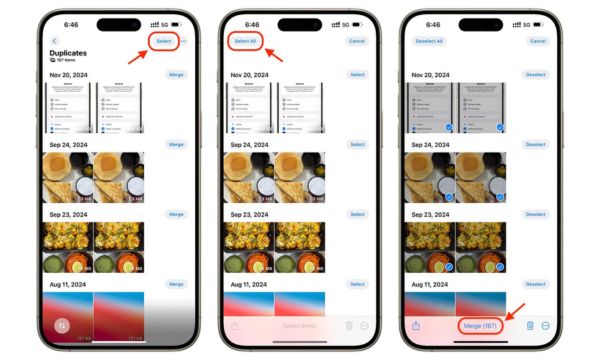
The system identifies similar images and groups them into stacks called photo stacks, making them easier to review and delete.
In addition, it offers:
- Detection of similar photos
- Smart category organization
- Quick keyword search
- Option to free up space with a single tap
Another benefit is cloud storage. Each user gets 15 GB free, which already helps a lot.
And if you need more space, there are plans starting at 100 GB for R$ 9,99 per month.
It’s a practical solution, especially for those who want something integrated and free.
Cleanup Phone Storage Cleaner: focused on deep cleaning
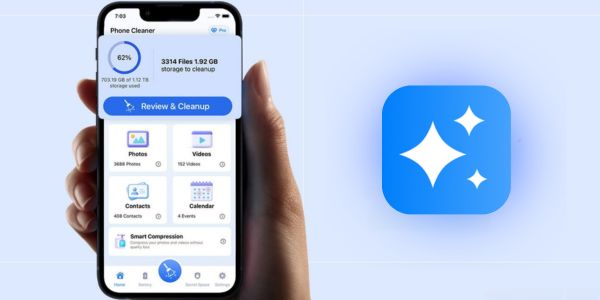
If you use an iPhone and want something even more straight to the point, the Cleanup App is an interesting option.
It was created with a total focus on deep gallery cleaning and automatic identification of duplicate photos.
The app allows you to:
- Instant detection of duplicate photos
- Smart grouping with the “best photo” marked
- Bulk deletion of screenshots
- Removal of similar videos
- One-tap cleaning
Another important difference is the review before deletion; nothing is erased without your final confirmation.
This gives peace of mind to anyone afraid of losing something important.
The app works offline and reinforces the idea of total privacy, and your data never leaves your device.
It is exclusive to iPhone users and offers a 7-day free trial period. After that, plans start at Professional Cleanup for 1 week – $ 5.95 or Cleanup Pro 1 Year – $29.99.
AI Cleaner App: Complete cleaning using AI
The main difference with this app is its use of artificial intelligence to detect duplicate photos, blurry images, and unnecessary files automatically.
It not only identifies exact copies, but also suggests removing old or low-quality images. The main features include:
- Automatic detection of duplicate photos
- One-tap deletion
- Photo and video compression
- Merging duplicate contacts
- Private vault for confidential files
The experience is very guided. The app practically… does the heavy lifting for you.
And that is ideal for anyone who feels that their phone is always full, even without knowing exactly why.
The app offers premium plans such as 1-week Plan – 7-day free trial – $ 6.99 and 1-year Ultimate Subscription – $ 34.99, allowing you to try it for a week before deciding.
Comparison: Which app is worth it?
Now comes the question everyone asks: Which one should you choose? Each app has a different profile.
Some are more integrated, while others go deeper into cleaning. To make it easier, here is a brief comparison:
| Feature | Google Photos | Cleaning app | AI Cleaner |
|---|---|---|---|
| Duplicate Detection | ✔️ | ✔️ | ✔️ |
| Similar photo detection | ✔️ | ✔️ | ✔️ |
| One-tap cleaning | ✔️ | ✔️ | ✔️ |
| Offline mode | ✔️ | ✔️ | |
| Secure vault | ✔️ | ✔️ | ✔️ |
| Free Version | ✔️ | 7-day trial | 7-day trial |
| Starting premium price | US$ 1.99 (100 GB plan) | $ 5.95 / week | $ 6.99 / week |
In short, if you want something free and already integrated into the Google ecosystem, Google Photos works well.
If you prefer full control on iPhone, Cleanup can be more straightforward. And if you want to test AI automation, try AI Cleaner, which offers convenience.
Tips before deleting duplicate photos
Before you start deleting everything, take a breath; a few simple tips make a big difference:
- Make sure that backup is enabled before starting any cleanup.
- Carefully review the app’s suggestions and confirm what you really want to delete.
- Keep at least one copy of important photos, especially unique moments.
- Delete in stages, not all at once, to avoid regrets.
- Take one last look at the trash before emptying it permanently.
Another important point: sometimes similar images capture different moments; “less pretty” does not always mean one is less valuable than the other.
Deleting duplicate photos is great for freeing up space, but do it with awareness.
In the end, organizing your gallery brings a sense of lightness that goes beyond free storage.
It’s like tidying up a closet that has been messy for months. Your phone gets faster, and so does your mind!
Less clutter, more space for what matters.
Now that you know the best options for finding and deleting duplicate photos, choose the one that best fits your system and get started today.
Small digital actions are also part of a more organized life.
Removing duplicate photos is not just about freeing up space. It’s about making your gallery lighter, more practical, and easier to use every day.
The less digital information you have, the faster you find what really matters.
And there’s something almost therapeutic about it: you clean your phone… and feel like you’ve also organized a small part of your life.
If you enjoy discovering tools that make everyday life easier, keep exploring our content.
There is always a smarter way to use technology in your favor, and the next tip could improve your routine even more.



