Whether you’re someone who likes to capture moments or someone who works in the field and needs a little help when editing your videos!
In this article, we’ll present 5 apps to create videos or make your videos even cooler and more appealing.
Currently, there are some app options that let you create and edit your videos on your phone.
These platforms allow you to add captions, effects and filters, music, and many other things.
Advertisement
These apps are widely used to produce videos for websites and social networks such as Tik Tok and Kwaii, in addition to allowing users to create fun GIF montages.
And what stands out most is the practicality and simplicity of editing and creation that these platforms offer users, without limiting content only to the most advanced creators.
So, check out 5 apps to create videos below and see which ones best fit your needs.
FilmoraGo – apps to create videos
The FilmoraGo app is available for both Android and iOS devices.
The advantages of this platform are that FilmoraGo has its own royalty-free music library, so there’s no need to worry about having the audio blocked on social media.
In addition, the app is easy to use and lets you combine different videos, split a file, and add transition effects or other elements.
Advertisement
WeVideo
As for WeVideo, it is an app with several editing features, allowing you to cut, add effects, transitions, soundtracks, and frames, giving the video a more professional look and making it possible to end one clip into another.
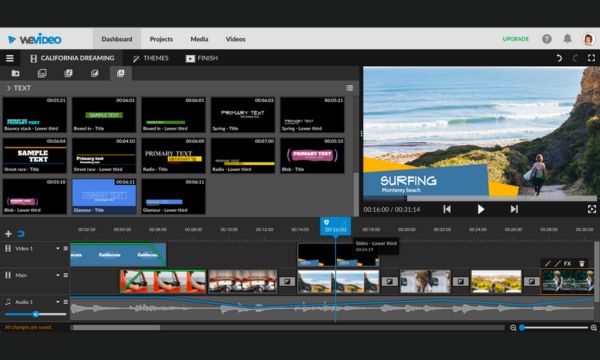
It’s worth remembering that, although the app is free, it has paid plans that allow the user to access licensed clips, photos, and music.
In addition, after finishing the edit, you can download the media to your phone and share it via WhatsApp, Telegram, email, among others.
The app is available for download on Android and iOS devices.
Filmadora
Filmadora is an iOS-exclusive app that offers different video suggestions.
Do you miss those childhood videos you recorded at the beach or at the Christmas party?
Using Filmadora, you can create videos that look like they were recorded on those old VHS camcorders that were very popular in the 1980s and 1990s.
This tool simulates the effects and characteristic noise of a classic home camera that needed tape to record.
Even the characters displaying the date and time are the same as the old ones, giving the edit a retro touch.
Adobe Premiere Rush – app to create videos
Adobe apps have advanced features for customized creations.
Time adjustment, color enhancement, overlay, music insertion, animation, and automatic reconstruction are some of the features.
After putting it together, you can quickly share the files on TikTok, Instagram, and Facebook to show your creations to friends.
It’s free, but some features are only available in the paid version.
Filmr
The Filmr can be downloaded on Android or iOS devices and offers beginner-friendly features as well as tools for experienced editors, opening up endless creative possibilities.
You can use vintage filters, add narration, rotate or flip images, and add augmented reality characters.
With this app, it’s also easy to create GIFs, slide presentations, tutorials, and stop-motion animations, convert them to different formats, and share them on your preferred platforms, such as Twitter, Instagram, WhatsApp, among others.
Now that you know each of these apps and what they can offer to make your videos much more attractive, all you have to do is identify which one best suits your needs and start creating right away.



